

My UNHCR
The portal provides an online tool offering multiple services for refugees registered with UNHCR in Egypt.
Please note that this portal can only be accessed using a mobile phone or tablet. It is not supported on desktop or laptop computers.
Through the electronic portal, you can:
- Renew your card / Self-verification
- View and print residency appointment information
To access the digital portal, click the following button.
If your UNHCR white/yellow/blue card has expired and no changes are required (such as adding a family member), you can renew your card through the portal without visiting the office.
UNHCR will send you an SMS within 7 days with the date and location for collecting your renewed card.
Please note that this service is only available at the beginning of the month in which your card expires (Example: If your card expires on March 17, you will only be able to use the portal starting from March 1 for renewal).
How does it work?
- log in to the online portal.
- complete self-verification for yourself and all family members over 12 years old.
- After verification is complete, UNHCR sends an SMS with the appointment to collect the renewed documents.
- Only one adult needs to be present to collect the card(s).
Required information:
- File number.
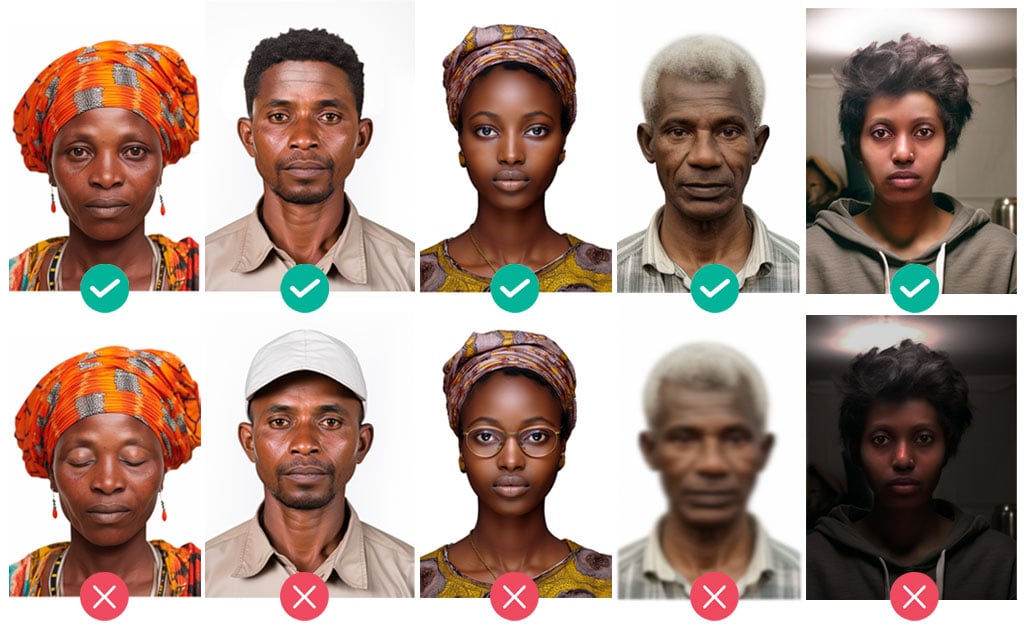
- A photo taken with a mobile phone during the process (to ensure your photo meets the standards, please review the photo instructions below).
Steps to Access Your Account on the Online Portal
- Click the link: eg.myunhcr.id
- Select your language from the list (Arabic or English).
- Click “Services” on the homepage.
- Choose “Facial Recognition” to log in.
- Read UNHCR’s privacy notice, then click “I Agree” at the bottom of the page.
- Enter your UNHCR file number and click “Verify.”
- Click “Allow” so the camera can take a photo of your face, then hold the phone steady for 3 seconds to capture the image. (Please make sure the photo meets the standards outlined below.)
Choose “Use This Photo” or “Retake.” - If the photo is correct, you will see: “Identity Verified Successfully” and you will be redirected to the homepage.
If verification fails, you will see: “Identity Verification Failed.” You can try several times until your identity is verified. If verification continues to fail, please visit the UNHCR Reception Center at: 17 Mecca Street, Seventh District, 6th of October City.
After logging in, proceed with the verification process for all family members.
Important Notes:
- Verification must be completed for all family members aged 12 years and above.
- Make sure all family members are present before starting the process.
1. Click on the “Presence Verification” icon.
2. Read UNHCR’s privacy notice, then click “I Agree” at the bottom of the page.
3. Click “Allow” so the camera can take a photo of your face, and the phone can determine your location.
4. Confirm your current phone number. If it is correct, click “Yes.” If it has changed, click “No,” then enter the new number. Enter the verification code sent to you via SMS, then click Next.
5. Select the governorate where you live or the closest one, then click Next.
6. A list of family members requiring verification will appear. Click “Start Verification.”
7. Take a photo of each person by clicking Next, then Take Photo.
Hold the phone steady for 3 seconds in front of the face, ensuring good lighting and no other people in the photo. Then choose “Use This Photo” or “Retake.”
8. If a family member is not present, click Skip and select the reason for their absence.
9. You will be asked about adding or removing family members. Select “No,” as this option is not available in Egypt. If you need to add a member, contact UNHCR to book an appointment. To find UNHCR’s phone number and reception center address, visit this page.
10. When all steps are completed, a message saying “Success” will appear. Click Close. Once verification for all individuals in the file is complete, the “Presence Verification” icon will be disabled.
UNHCR will send you an SMS within 7 days with the date and location for collecting the renewed cards.
Only one adult needs to be present to collect the card(s) from the UNHCR office, and you must bring all expired documents to exchange them for the new ones.
- Hold the camera straight in front of your face.
- Your entire face is clearly visible.
- Your eyes are open and looking at the camera.
- Do not wear a hat or glasses (headscarf is allowed).
- The photo is not blurry.
- Your face is in a well-lit area.
- The background is clear and free of details.
- No other person is in the background.
- Hold the phone steady for 3 seconds until the photo is captured automatically.
Viewing residency appointment information
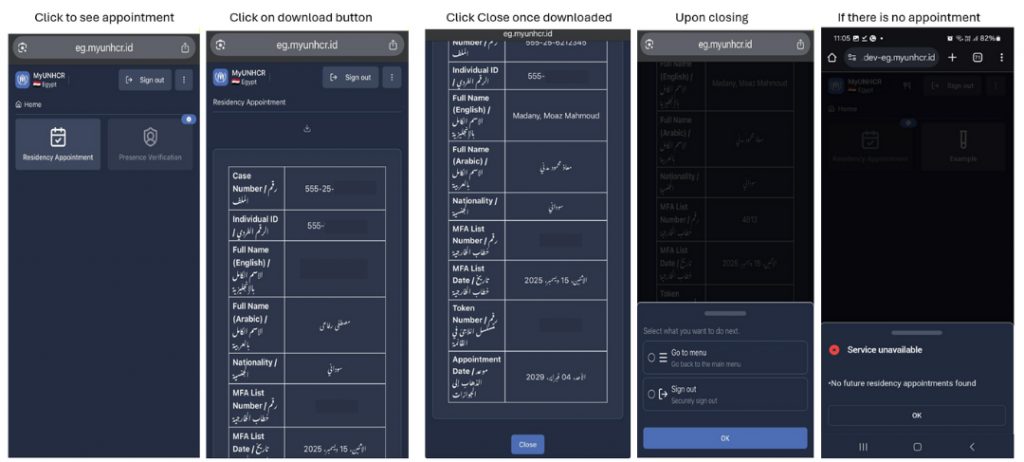
If you already have a valid residency appointment and if you have forgotten the information, lost the SMS or your appointment date is changed as a result of rescheduling exercise, you can log in to the portal and view this information.
You can also download it in PDF format. The PDF will be locked with a password, and the password will be the date of birth of the focal point of the case in this format DDMMYYYY. two-digit day, two-digit month and 4-digit year.