



Closure and termination of the process
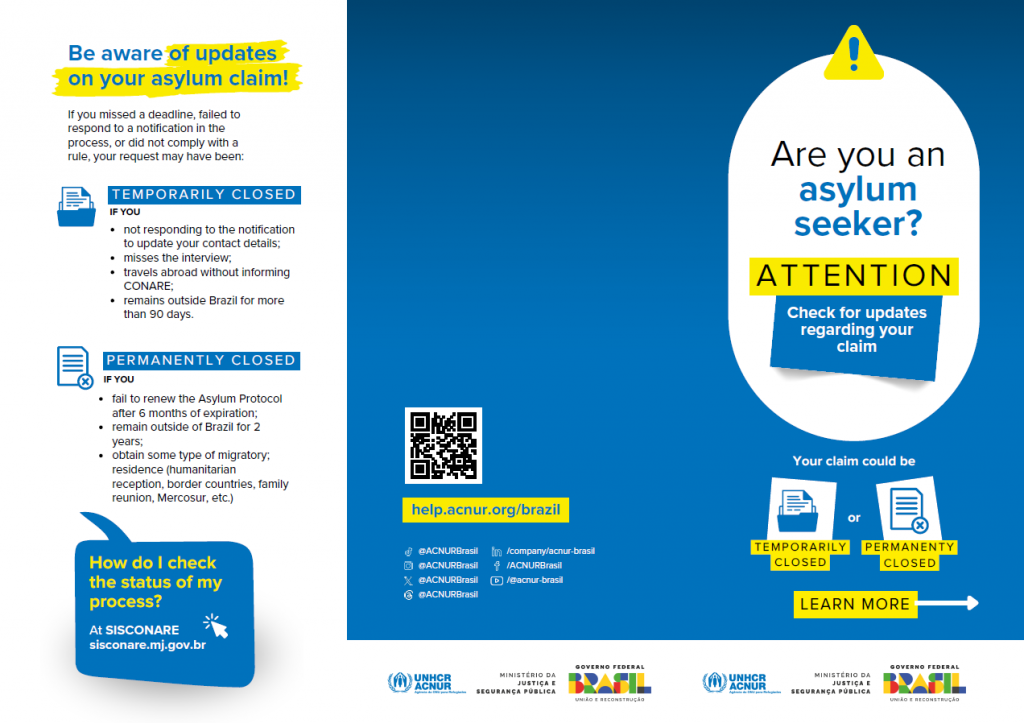
Are you an asylum seeker? Be aware of updates on your asylum claim!
If you missed a deadline, failed to respond to a notification in the process, or did not comply with a rule, your request may have been:
- Closure (archived/temporarily closed): the process is temporarily paralyzed (leaving the analysis queue), and it is not possible to renew the Protocolo de Refúgio (Asylum Protocol).
This occurs in situations where the applicant misses the interview, travels abroad without informing CONARE, or, even if they have communicated, remains outside Brazil for more than 90 days within a year!
- Termination (permanently closed): the process is definitively concluded, without the grounds for your asylum request having been analyzed.
This occurs in situations where the applicant fails to renew the Protocolo de Refúgio (Asylum Protocol) after 6 months of expiration, remains outside Brazil for 2 years, or obtains some type of migratory residence (humanitarian reception, border countries, family reunion, Mercosur, etc).
Firstly, keep your Protocolo de Refúgio (Asylum Protocol) and Provisional National Migration Registration Document (DPRNM) up to date! Even if you have the DPRNM, you need to pay attention to the expiration date of your Protocolo de Refúgio (Asylum Protocol) and renew it every year!
Furthermore, remember to regularly check the progress of your asylum claim on SISCONARE and pay attention to messages!
Attention!
- The Brazilian government’s main form of communication with asylum seekers is through SISCONARE.
- Remember to check your registered email frequently. A message could be sent there too! Be aware!
If your asylum claim has been temporarily closed, you can request it to be reopened by CONARE. You must fill out a form and submit the request electronically through SEI!
Check here for detailed instructions or ask for support from a UNHCR partner organization closest to you.
In case your process has been permanently closed, it is possible to make a new asylum claim at SISCONARE.
If you have any questions, write to [email protected] and clarify the situation in detail or ask for support from a UNHCR partner organization.
Except for the form that you will fill out, SEI is in Portuguese, so we put here the step by step highlighting the words in Portuguese in quotes so that you can identify when filling out the petition:
1️⃣ Fill out the “Formulário de desarquivamento de solicitação de reconhecimento da condição de refugiado“.
2️⃣ Access SEI and register as a user, according to the instructions in the manual.
3️⃣ After obtaining access to the SEI, enter the system with your login and password.
4️⃣ On the left side, under “Peticionamento”, choose the “Intercorrente” option.
5️⃣ In “Número de processo”, enter the number of your Protocolo de Refúgio (Asylum Protocol) and then click on “Validar”.
6️⃣ After clicking on “Validar”, the SEI will complete, in the “Tipo” field, the information “Migrações: Pedido de Refúgio”. Click “Adicionar”.
7️⃣ Then, go to the “Escolher arquivo” option. Select the form already filled in with your information.
8️⃣ In “Tipo de documento”, choose “Formulário” and, in the “Complemento do tipo de documento” field, place “Desarquivamento”
9️⃣ In “Formato”, choose “Nato-digital”.
🔟 Then click on “Adicionar”.
1️⃣1️⃣ In “Interessado”, include your own name.
1️⃣2️⃣ After including the form, click on “Peticionar”.
After this registration, your registration will be analyzed by the General Coordination of CONARE.
If you need support, contact the Ministry of Justice by e-mail at [email protected] or by phone (61) 2025 9734.
In case you need any help in this process, you can also contact your nearest UNHCR partner organizations.
If you prefer, watch the video prepared by CONARE (in Portuguese):
For more information on renewing your DPRNM, please visit the How do I renew my Provisional National Migration Registration Document (DPRNM)? page.
You can log in through:
- The registered email address
- the number of the Protocolo de Refúgio (Asylum Protocol) or
- The number of your CPF
NOTE! You will still need to remember your password.
After logging in, access the “SOLICITAÇÕES” option.
Pay attention to the message that appears in the “ANDAMENTO DO PROCESSO” field: it may indicate that your process has been TEMPORARILY CLOSED or PERMANENTLY CLOSED.
If the message indicates “AGUARDANDO AGENDAMENTO”, it means that a decision has not yet been made and you need to wait a little longer. You may be invited to an interview or notified of a decision. Therefore, check SISCONARE frequently and pay attention to messages.
If the message indicates “AGUARDANDO AGENDAMENTO”, it means that a decision has not yet been made and you need to wait a little longer. You may be invited to an interview or notified of a decision. Therefore, check SISCONARE frequently and pay attention to messages.
In the “AÇÕES” field, you can also click on the icon to “DETALHAR ANDAMENTO DO PROCESSO” or on the “VISUALIZAR” icon to access the HISTÓRICO DE NOTIFICAÇÕES tab and, in the RESULTADO DO PROCESSO, download the decision without its merits analysis.
Decision taken!
Furthermore, another decision may have already been made without you being aware of it. This means that your asylum claim was APPROVED or DENIED.
Follow the same path after logging into SISCONARE and click on EXIBIR ANEXOS to access your NOTIFICAÇÃO with the recognition or rejection of your asylum claim. In the “AÇÕES” field, you can also DOWNLOAD the decision.
If you do not remember your login or password, you can recover your access on many ways:
(1) Using your registered email
On the SISCONARE home page, click on the message “Você esqueceu seu nome de usuário e/ou senha?”. A new window to recover your password will open, where you can fill in the field with your registered primary email and press the confirm button. After that, a password recovery message will be sent to the main email registered on the platform.
Simply click on the message “alterar sua senha para o SISCONARE” to be directed to the screen for defining a new SISCONARE password.
(2) If access to the registered email was lost
On the SISCONARE home page, click on the message “Você esqueceu seu nome de usuário e/ou senha?”. A new window to recover the password will open. Select the “não tenho acesso ao meu e-mail principal” box.
Fill in all the fields requested by the system, with the same data as that initially registered in the system.
After filling in these details correctly, a screen will appear asking you to register a new main email.
After clicking “Confirmar”, you can perform the password recovery procedure through your email, as in the previous step.
(3) Other modes
You can also send a message to [email protected] and ask for support with reactivating your registration.
If you have any questions, contact the Federal Police or the nearest UNHCR partner organization.