



UNHCR Services
The Home – Digital Request and Complaint System is an online platform for requests and complaints from refugees and asylum-seekers in Ethiopia.
How can you access UNHCR services?
Access the DRCS (Home – Digital Request and Complaint System) to:
- Request a service
- Make an appointment
- Make a complaint
- Check the status of your request
To make a complaint online
To make a complaint online, you can access Make a complaint or Request a service
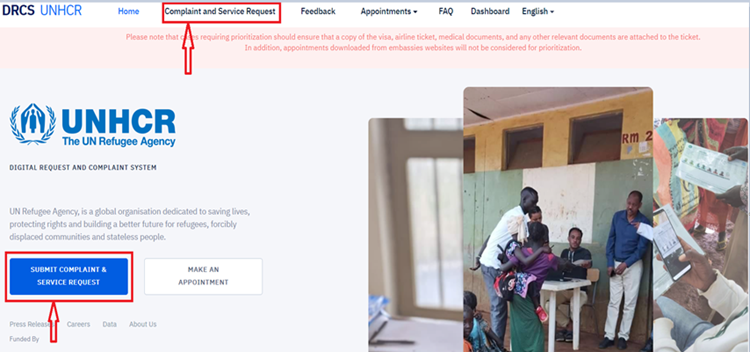
Once you click the complaint and service request button, the aside form will appear below.
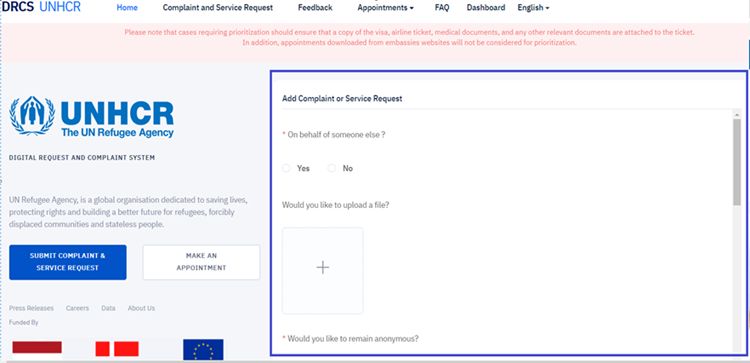
- Questions with red asterisks on the form should be filled.
- Fill the form based on your need and the service provider you are requesting services (UNHCR or RRS)
- When the form is filled out fully, the captcha is confirmed, and then click on submit. However, the submit button will not be active when the form is not completed fully. The captcha is requested for security purposes.
- Once you have submitted your form, an automatic ticket number will be generated. You need to save that ticket. You will use the ticket for follow-up and know the status of your request. For example, with the ticket number, you will know the date of your appointment, which is made by yourself, scheduled by the service provider (RRS, UNHCR, etc.), or when your appointment has been rescheduled due to unpredictable circumstances. QR code is integrated with the ticket to quickly verify the appointment date and address with a smartphone or any device with such capability.
- With a received ticket, you will be able to feedback on how the service provision was handled, and this aim also to enhance the service delivery. The feedback is anonymous.