



Received My Services invitation and ready to create your account?
A smartphone or computer,
Access to your e-mail address which you shared with UNHCR,
Access to your mobile phone number in India which you shared with UNHCR,
Internet connectivity.
How to Create Your Account:
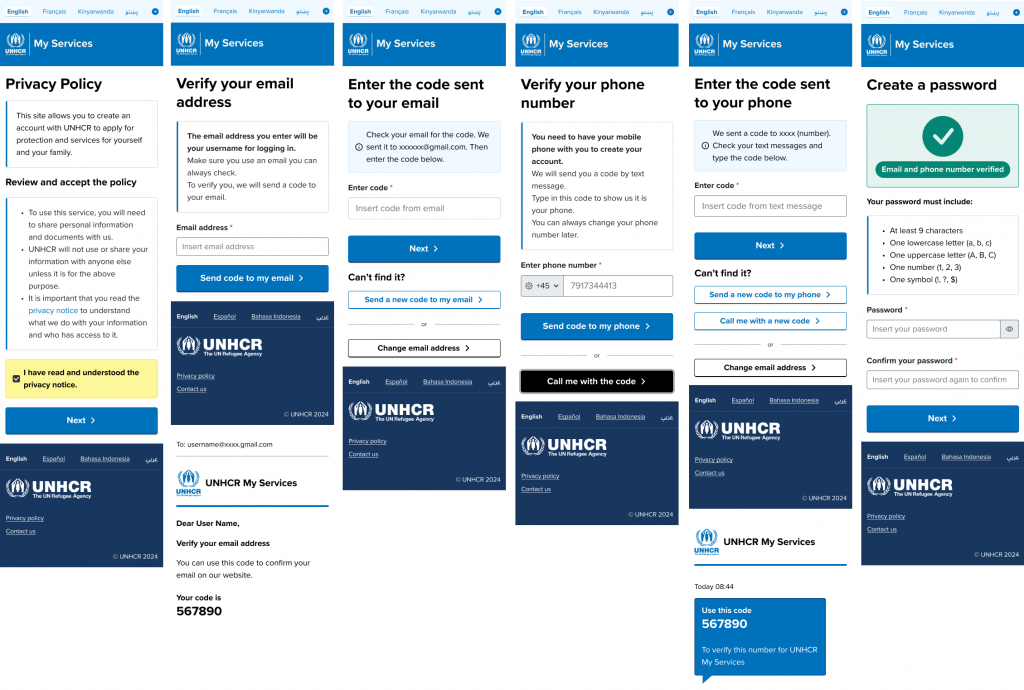
1Click on the link you received on your e-mail
2Confirm your email address
Confirm your email address that will appear on the screen by entering the verification code sent to your e-mail. If you do not receive the code, you can click “send new code”.
3Register your phone number
Enter your mobile phone number in India, (not a WhatsApp-only number), and input the code sent by SMS. If you do not receive the code, you can click “send new code”.
Note: Please use an active number — we may send important messages to that phone number.
4Create a password
Create a password that is easy to remember and meets the following requirements:
- At least nine characters,
- One uppercase letter (A, B, C, etc.),
- One lowercase letter (a, b, c, etc.),
- One number (1, 2, 3, etc.),
- One symbol (!, ?, $, etc.).
5Access your data
Once your account is created, you will automatically access your data and services available to you.
Still have questions? Have a look at our FAQs ?
If you no longer have access to that e-mail, please contact UNHCR for support by e-mailing us at [email protected].
You need internet access and a smartphone or computer to use the portal.
You can borrow a device from someone you trust or use a public device (for example, at a digital hub or internet café). Make sure:
- You use your own e-mail address and phone number
- You log out of your account when you finish
If you cannot access the portal, you can still request services in other ways by e-mailing us at [email protected].
No. For your safety, you should not share your password with anyone, even family members.
If you need help using your account, you can ask UNHCR to delegate access to someone you trust.
Delegation allows them to manage your account securely without needing your password.