
How to request your registration appointment
Step one: Complete the information required to apply for registration with UNHCR and upload your documents.
- Personal information: You can either upload or take a photo of your passport for it to be scanned or you can enter your personal details, including your name, date of birth, where you are from, sex, and marital status. You will need to add your name in English on a separate line if you are using the portal in a different language. Fields marked with a red “required” must be filled in. If you leave these blank, you will not be able to continue.
- Address and arrival date: Enter your address in your home country, your current address in Indonesia and your arrival date.
- How to contact you:
- E-mail address: Already filled, cannot be changed
- Registered phone number: This number is the one you added when you created your account.
- Contact me by SMS: You can tick the box if you would like to be contacted by SMS.
- Contact me on WhatsApp: You can tick the box if you would like to be contacted by WhatsApp and provide your number.
- Preferred language: Select from available languages.
- Additional information: Enter information on any specific needs you may have. This is something optional.
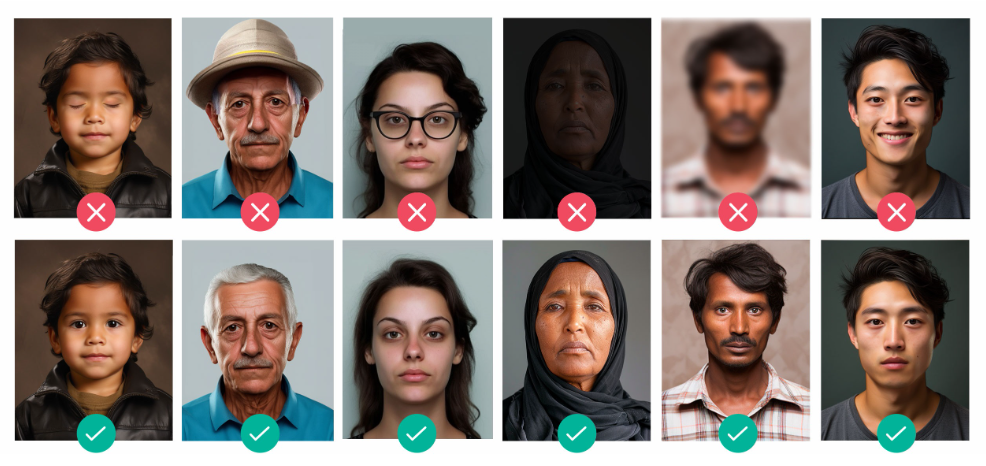
- Photo: Take a photo of your face / “selfie” using the button on the screen or upload a photo of your face you already have. The photo should be of good quality, similar to a passport photo (Please see below for more the guidance).
- Documents: You can also upload a copy of your passport and national identification document, or any other identity document you may have in your possession. Please only upload your identity documents. Your family members’ documents will be entered when you add your family members to your application.
Click Here for Photo Guidance
When uploading your photo, make sure that:
- All of your face is visible in the photo.
- You have your eyes open and look into the camera.
- You are not wearing any hats or glasses (headscarves are allowed).
- The photo is not blurred.
- Your face is in the light.
- There is a plain background to your photo.
Tip: If you try to take a photo but nothing happens when you click the button, check your phone settings. You may have to change your permissions so the application can access the camera.
Step two: Add your family members
Only your close family members currently with you in Indonesia can be included on your application for a registration appointment.
Family members may include your children, spouse, or elderly family members who are dependent on you. You will have to provide the same information you provided about yourself for all family members you wish to register with you, including their ID documents and photos. We recommend that they are with you while you complete their information.
Step Three: Review your application before submitting it to UNHCR
- Click on ‘My Profile’ to review your personal information, contact details, and photograph.
- Click on ‘My Documents’ to review the documents you uploaded for yourself.
- Click on ‘My Family’ to review the personal information, photograph and documents you uploaded for your family members.
Step Four: Submit your registration application to UNHCR
- Once you are happy the information, photographs and documents in your application are correct, click on ‘Submit My Application.
- Note that once you submit your application, you will not be able to change your personal. information. You can only add additional documents and update your communication information.
Step Five: You have successfully submitted your application. What is next?
- Take note of your temporary UNHCR ID number for future communication with UNHCR. You can also find this reference number in the ‘Home’ page.
- The status of your registration application when you submit is “Pending registration.” You can check the status of your application in the ‘Home’ page or check the ‘My Appointments’ page to see the date, time and location of the appointment UNHCR sets for you once your application is reviewed.
- You will receive a notification to your e-mail address once your appointment is scheduled and UNHCR will contact you with further information.
- UNHCR will aim to contact you with an update within two weeks; however, please note that this does not mean your interview will take place within two weeks. Due to the high volume of requests, it may be several months before your interview is scheduled.